









TAM The Action Manager Get The Action Manager Now for only £1.00 per User per Month45 DAY MONEY BACK GUARANTEE
HomeHealth and Safety Management SoftwareOperational ManagementWhy Buy TAM?How TAM WorksFAQs45 Day Money Back GuaranteeOrdering TAMAbout Us Contact Us
Health and Safety Management Software
Free Demo
Request a free online demo of TAM here.
Testimonials
"It is amazing how comprehensive this Health and Safety management software really is."
"Most of our staff have successfully started using TAM's Health and Safety software with a minimal amount of of training."
"Our risk management has vastly improved since we started using The Action Manager Health and Safety compliance software."
"TAM's fire risk assessment tools and fire risk assessment template have been a great help."
"TAM's risk assessment software provides you with a template that makes the risk assessment process so much easier."
"The Action Manager health and safety compliance software makes it really easy to manage staff training and keeping training records online."
"The free health and safety software access for non-users is a very cost effective online document sharing option."
"The way TAM's Hazard Spotting exercise works has really helped promote good risk management."
"Using TAM has made Health and Safety compliance much less of a chore to manage and keep track of."
"We are more than happy to recommend The Action Manager health and safety compliance software."
"We love TAM's health and safety training software, which has made keeping track of staff training records a breeze."
"An advantage with the Accident Reporting software on TAM is that it allows you to control who is authorised to approve Accident Reports and RIDDOR Reports, and who has access to the historical accident and incident records."
"As the person responsible for Health and Safety in our company, I really like that TAM's Accident Reporting software sends me alerts to my email and mobile as soon as an accident or incident is being reported.
"The fire safety checklist and the health and safety checklist provided by TAM have meant that we can rid ourselves of all the old hardcopy records and now view these online instead."
"The health and safety audit dashboard makes health and safety compliance so much easier."
"By using The Action Manager's fire risk assessment template, one can be sure that all the fire safety related tasks created are properly tracked until completion."
"TAM's Accident and Incident Reporting template is really quick and easy to use, and we like how TAM's accident reporting procedure automatically helps us determine whether an accident or incident is RIDDOR reportable."
"We purchased TAM because we needed a Health and Safety software, however, the task management software that comes with TAM has been a revelation."
"The templates for risk assessments, safe systems of work, COSHH, hazard spotting, fire risk assessment, etc. has made health and safety compliance a lot easier for us."
"TAM's free health and safety software access for non-user has allowed us to comply with numerous health and safety regulations and cut cost in the process."
"The health and safety audit dashboard that summarises all our sites' health and safety compliance has made my job so much easier".
"The fact that we can now view all the safety management systems online from anywhere in the world makes TAM an excellent health and safety software solution."
"With The Action Manager Health and Safety software, I can now access all our sites' accident books, records and RIDDOR reports from my laptop 24/7."
"TAM's simple structure makes it easy for us and our staff to understand what is required from us in terms of Health and Safety compliance."
"TAM's Health and Safety Policy template works really well and ensures that both fire safety and health and safety are actively managed."
"Although TAM offers free health and safety software access for non-users, you soon realise that you actually save money by making most staff users."
"We really like how TAM's COSHH Risk Assessment and Safe Systems of Work template allows us to properly manage chemicals throughout our company."
"The risk assessment and safe system of work template is well structured and has helped us maintain a consistent feel throughout our health and safety documentation."
"TAM's free health and safety software access for non-user has enabled us to comply with a number of health and safety regulations and cut costs in the process."
"Not having to rely on hardcopy risk assessments, safe systems of work, health and safety training records, etc. is such a relief."
"The Action Manager Health and Safety software provides you with an Accident Book template and an accident reporting procedure that our staff have found really easy to use."
"I love the fact that I can simply create tasks and routines on TAM and then forget about them, just knowing that they will get done."
"TAM's health and safety management software is both a much cheaper and better solution, than the health and safety procedures we were using before."
"Being a multi-site operator, we've really found the company Health and Safety audit dashboard a great tool to quickly identify areas were we still have work to do."

Accident Reporting and Accident Investigation

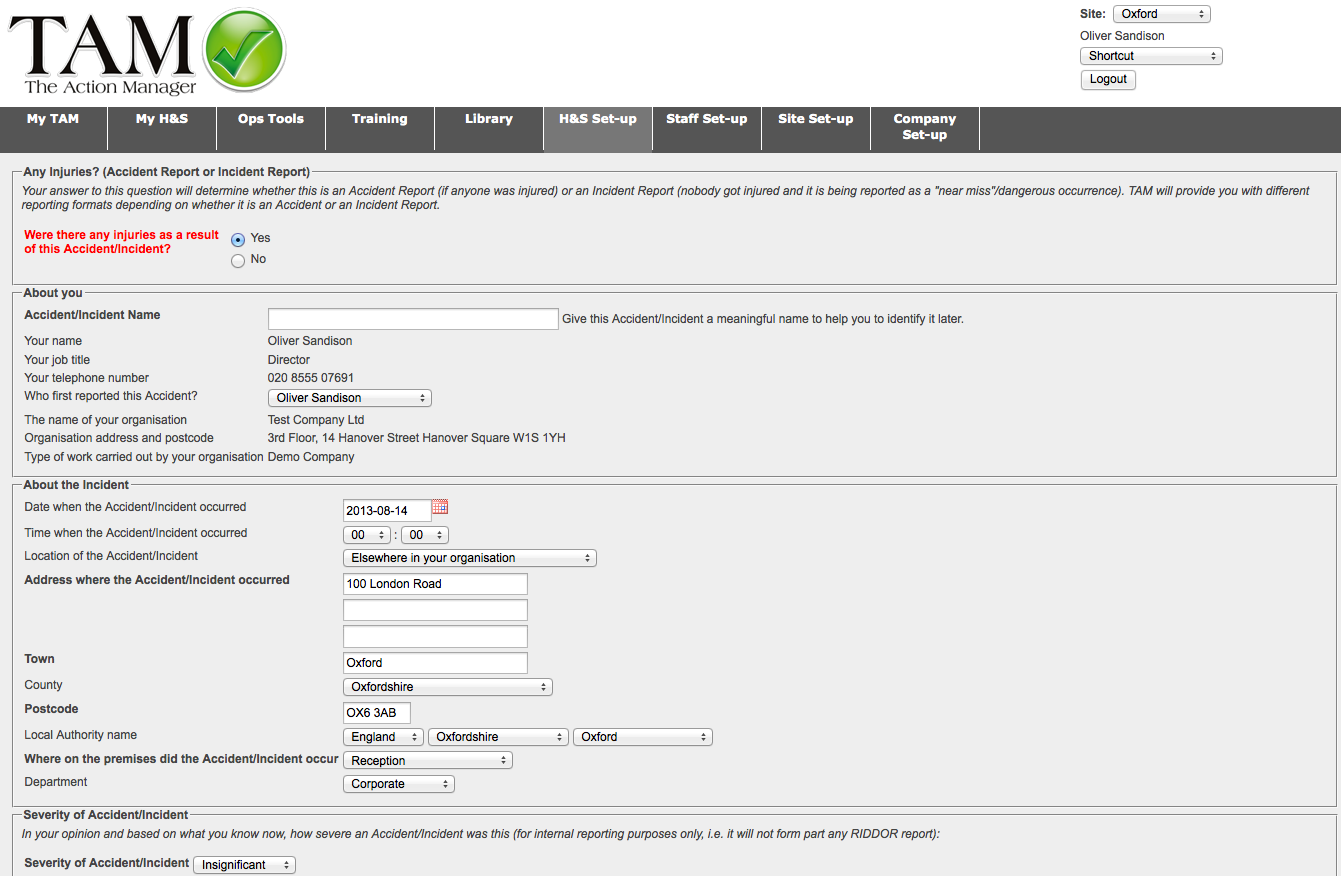
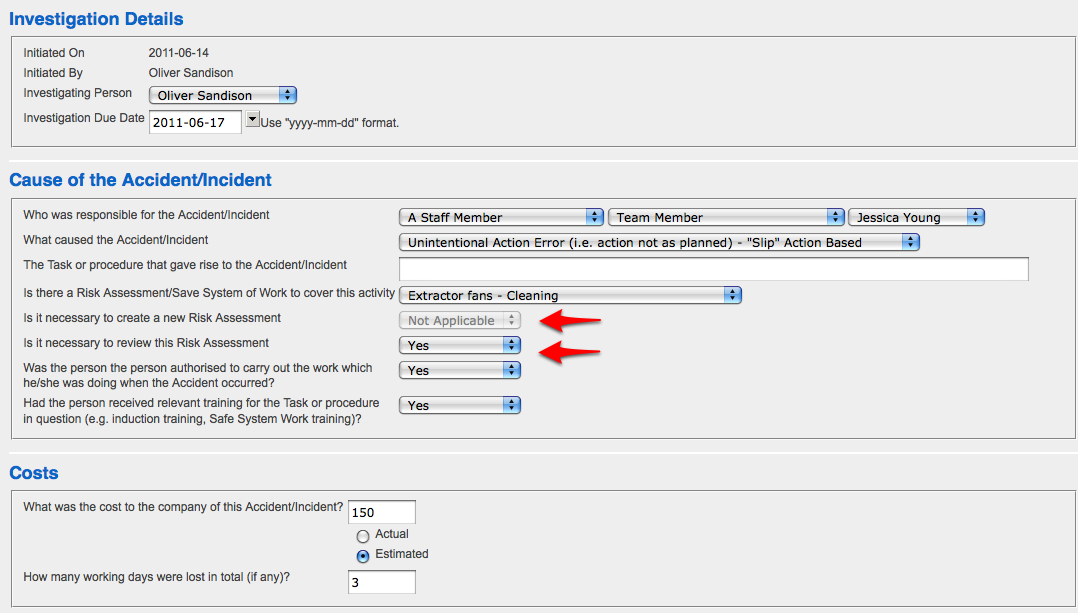
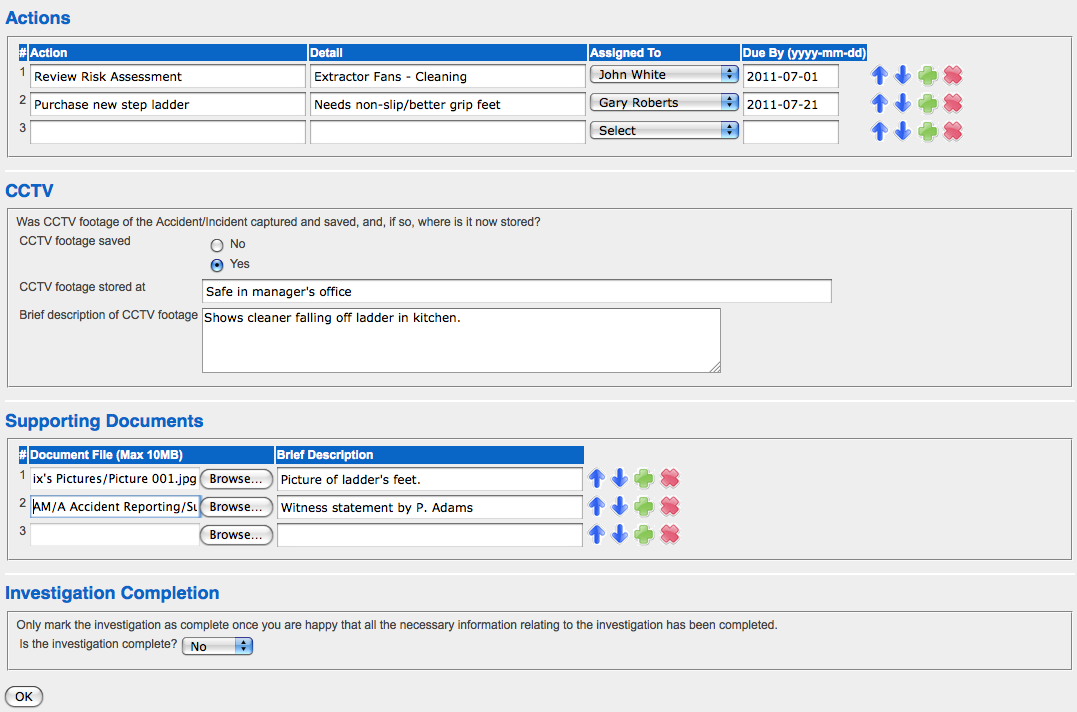
Accident Book template.  Accident reporting is done using TAM's Accident Book template, which is both easy and quick to fill out, with much of the information automatically pre-populated by TAM.  Accident Reporting Software.  Accident Reporting is really straightforward when using TAM's Accident Book template.  This Accident Book template also helps determine whether an accident or incident is RIDDOR reportable or not. You can also use TAM's Accident Reporting Software to carry out Accident Investigations. Accident Reporting Software:  When you create a new Accident Investigation, you assign it to someone and set a deadline, which TAM will help you to keep track of.  You can provide important information on who and what caused the accident.  These drop-downs are automatically populated with the customisable information that you have already provided on TAM so it is quick and easy to fill out. By specifying that, in light of your Accident Investigation findings, you think a new Risk Assessment is required or that an existing Risk Assessment needs reviewing (see the arrows in the picture), then TAM will automatically either create a new Draft Risk Assessment or make the Risk Assessment you highlighted become due for an immediate review. Accident Reporting Software:  In addition to being able to note down your findings and recommendations as part of your Accident Investigation, you will also be able to create specific Actions, which TAM will track for you until completion.  You can also upload documents on TAM to support your Accident Investigation to ensure you have everything in one secure place.
You can report and store all your Accident, Incident and RIDDOR Reports on TAM's accident reporting software and there are many advantages in doing so.

Accident Book Template

TAM will provide you with an Accident Book template that's easy to understand, quick and simple to complete, with much of the information being automatically populated by TAM. 

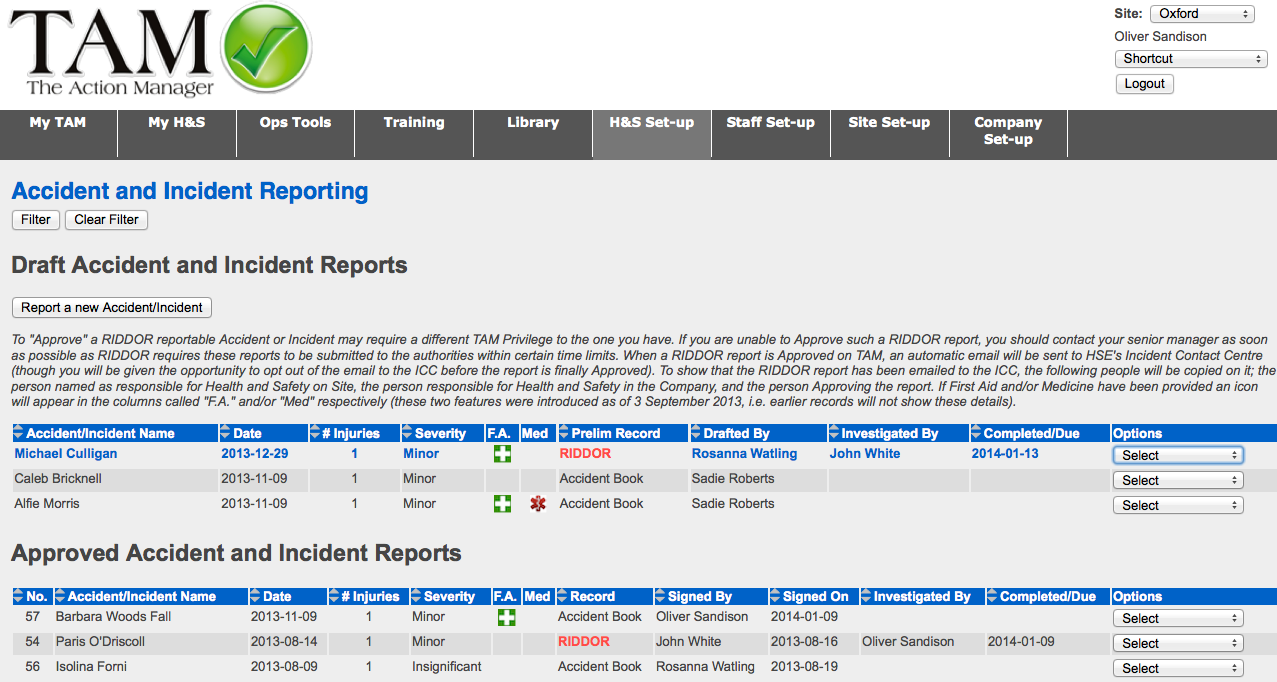
TAM also keeps your Accident Book records for you, making it possible for management to log on from anywhere in the world 24/7 and view the details of any accident.

Formal RIDDOR reporting to the HSE using TAM's Accident Reporting Software

When reporting accidents, TAM's accident book template will ask a series of questions to help determine whether the accident or incident ("near miss") is RIDDOR reportable (i.e. the accident or incident is so serious that the HSE needs to be notified).

An Accident Report, which has been drafted on TAM and that is deemed to be RIDDOR reportable, will only be submitted to the HSE once it has been formally approved by an authorised person in your organisation.

Accident Investigation

An important part of our Accident Reporting software is the Accident Investigation feature, which allows you to:
  • Create an Accident Investigation for each Accident/Incident reported in the Accident Book
  • Analyse who and what caused an Accident/Incident - a series of pre-populated, customisable drop-down menus ensure this can be done quickly as well as provide valuable information for future statistical analysis
  • Establish the overall cost to your organisation caused by Accidents/Incidents
  • Track Accidents/Incidents (and their associated costs) by, amongst other things, Department, Position (even by individual), Contractor, etc
  • Write down your findings and recommendations
  • Create Actions in direct response to your Accident Investigation findings, which TAM will then track for you until completed
  • Upload supporting documents and pictures on TAM (e.g. witness statements, pictures of where the accident took place, etc)
The great advantages with doing the Accident Investigations on TAM is, firstly, that, not only will TAM help you manage these, but the system will also ensure that there are no loose ends by tracking any Actions that you have created as part of your Accident Investigation until they are completed. Secondly, by keeping all your information and supporting documents securely stored on TAM, it means that the information can be electronically accessed 24/7 from anywhere in the world (albeit only by people with the appropriate TAM Privileges, see point below).

Control who is authorised to approve Accident and RIDDOR Reports, or carry out an Accident Investigation

When using TAM's Accident Reporting software, you are able to specify on the system who is authorised to:
  • Draft an Accident or Incident Report
  • Approve an Accident or Incident Report to be recorded in the Accident Book that is NOT RIDDOR reportable
  • Approve an Accident or Incident to be recorded in the Accident Book that is also RIDDOR reportable (i.e. where an automatic email with the RIDDOR report is sent to the HSE's Incident Contact Centre).
  • Carry out an Accident Investigation
This way you can ensure no report is permanently recorded in the Accident Book or sent to the HSE before it has been reviewed and approved by a person entrusted with this task.

Control who has access to the historical records in the Accident Book

Similar to above, you can also control who can access the Accident Book, RIDDOR reports and related historical records stored on TAM.

Internal alerts when an accident is being reported

You can specify on TAM the people within your organisation that you wish to be notified of accidents recorded in the Accident Book and/or accidents that are deemed to be RIDDOR reportable (whilst the report is still in draft form and before the report has gone out).

View statistics

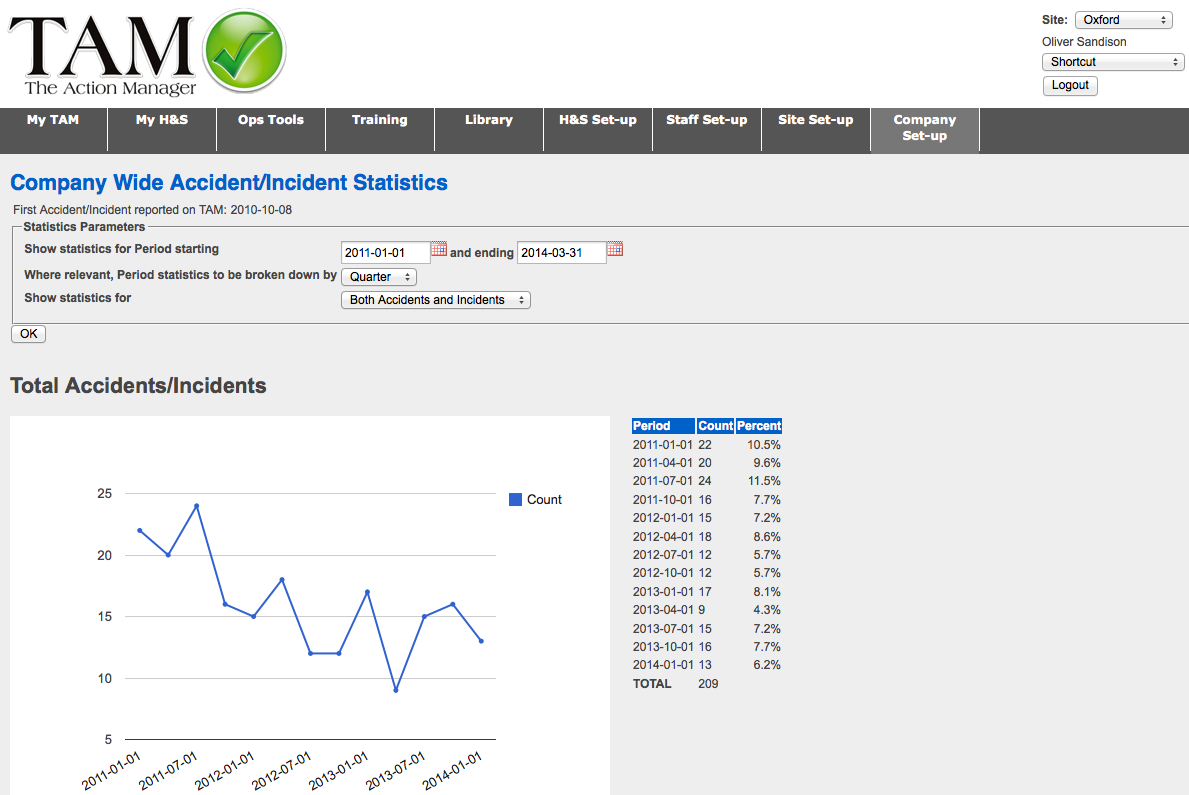
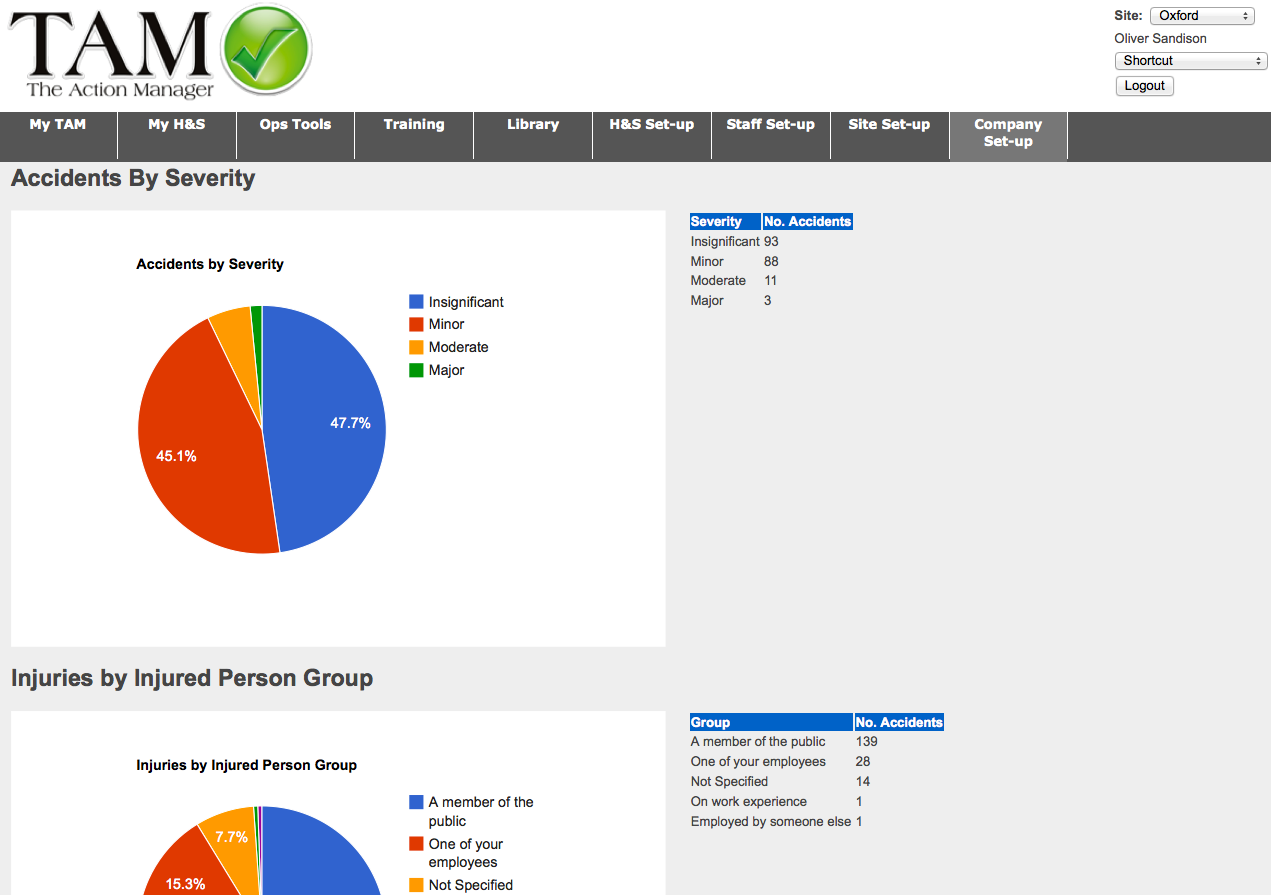
Finally, TAM will provide you with a range of statistics on the accidents and incident that have occurred throughout your organisation. You can view the data in the charts provided or you can download the data into your own spreadsheets.

Get The Action Manager Now for only £1.00 per User per Month45 DAY MONEY BACK GUARANTEE