








TAM The Action Manager Get The Action Manager Now for only £1.00 per User per Month45 DAY MONEY BACK GUARANTEE
HomeHealth and Safety Management SoftwareOperational ManagementWhy Buy TAM?How TAM WorksFAQs45 Day Money Back GuaranteeOrdering TAMAbout Us Contact Us
Health and Safety Management Software
Free Demo
Request a free online demo of TAM here.
Testimonials
"It is amazing how comprehensive this Health and Safety management software really is."
"Most of our staff have successfully started using TAM's Health and Safety software with a minimal amount of of training."
"Not having to rely on hardcopy risk assessments, safe systems of work, health and safety training records, etc. is such a relief."
"Our risk management has vastly improved since we started using The Action Manager Health and Safety compliance software."
"TAM's fire risk assessment tools and fire risk assessment template have been a great help."
"TAM's Health and Safety Policy template works really well and ensures that both fire safety and health and safety are actively managed."
"TAM's risk assessment software provides you with a template that makes the risk assessment process so much easier."
"The Action Manager health and safety compliance software makes it really easy to manage staff training and keeping training records online."
"The free health and safety software access for non-users is a very cost effective online document sharing option."
"The health and safety audit dashboard that summarises all our sites' health and safety compliance has made my job so much easier".
"The way TAM's Hazard Spotting exercise works has really helped promote good risk management."
"Using TAM has made Health and Safety compliance much less of a chore to manage and keep track of."
"We are more than happy to recommend The Action Manager health and safety compliance software."
"We love TAM's health and safety training software, which has made keeping track of staff training records a breeze."
"The templates for risk assessments, safe systems of work, COSHH, hazard spotting, fire risk assessment, etc. has made health and safety compliance a lot easier for us."
"TAM's free health and safety software access for non-user has enabled us to comply with a number of health and safety regulations and cut costs in the process."
"TAM's simple structure makes it easy for us and our staff to understand what is required from us in terms of Health and Safety compliance."
"We purchased TAM because we needed a Health and Safety software, however, the task management software that comes with TAM has been a revelation."
"We really like how TAM's COSHH Risk Assessment and Safe Systems of Work template allows us to properly manage chemicals throughout our company."
"TAM's free health and safety software access for non-user has allowed us to comply with numerous health and safety regulations and cut cost in the process."
"The Action Manager Health and Safety software provides you with an Accident Book template and an accident reporting procedure that our staff have found really easy to use."
"The risk assessment and safe system of work template is well structured and has helped us maintain a consistent feel throughout our health and safety documentation."
"The fact that we can now view all the safety management systems online from anywhere in the world makes TAM an excellent health and safety software solution."
"TAM's Accident and Incident Reporting template is really quick and easy to use, and we like how TAM's accident reporting procedure automatically helps us determine whether an accident or incident is RIDDOR reportable."
"With The Action Manager Health and Safety software, I can now access all our sites' accident books, records and RIDDOR reports from my laptop 24/7."
"By using The Action Manager's fire risk assessment template, one can be sure that all the fire safety related tasks created are properly tracked until completion."
"An advantage with the Accident Reporting software on TAM is that it allows you to control who is authorised to approve Accident Reports and RIDDOR Reports, and who has access to the historical accident and incident records."
"Although TAM offers free health and safety software access for non-users, you soon realise that you actually save money by making most staff users."
"The fire safety checklist and the health and safety checklist provided by TAM have meant that we can rid ourselves of all the old hardcopy records and now view these online instead."
"The health and safety audit dashboard makes health and safety compliance so much easier."
"I love the fact that I can simply create tasks and routines on TAM and then forget about them, just knowing that they will get done."
"As the person responsible for Health and Safety in our company, I really like that TAM's Accident Reporting software sends me alerts to my email and mobile as soon as an accident or incident is being reported.
"TAM's health and safety management software is both a much cheaper and better solution, than the health and safety procedures we were using before."
"Being a multi-site operator, we've really found the company Health and Safety audit dashboard a great tool to quickly identify areas were we still have work to do."

Organised Hazard Spotting Exercises

Health and Safety management should not be a one-off event but an ongoing process.

TAM's tool for Hazard Spotting exercises combined with TAM's Health and Safety Committee meetings helps ensure this is the case, and allows you to demonstrate to the authorities that you are managing Health and Safety properly.

A Hazard Spotting exercise is organised on TAM like a formal walk through your workplace checking for hazards that may not have been previously identified. This involves looking for potential issues such as temporary trip hazards, changes in working processes, making sure only approved chemicals are being used, etc. Any new hazards that are identified can then be dealt with either immediately or, if this is not possible, brought to the attention of the Health and Safety Committee.

If you are a director or senior manager of a larger business, and/or one operating from several sites, this process will give you the comfort that your staff throughout the organisation are involved with risk management and Health and Safety matters on an ongoing basis.

The TAM Health and Safety software also helps you document this fact, so that you can show historical records of your ongoing attention to risk management should you be asked for this (e.g. in case of an inspection by the EHO following an incident in you workplace).

This is how the Hazard Spotting exercises work...
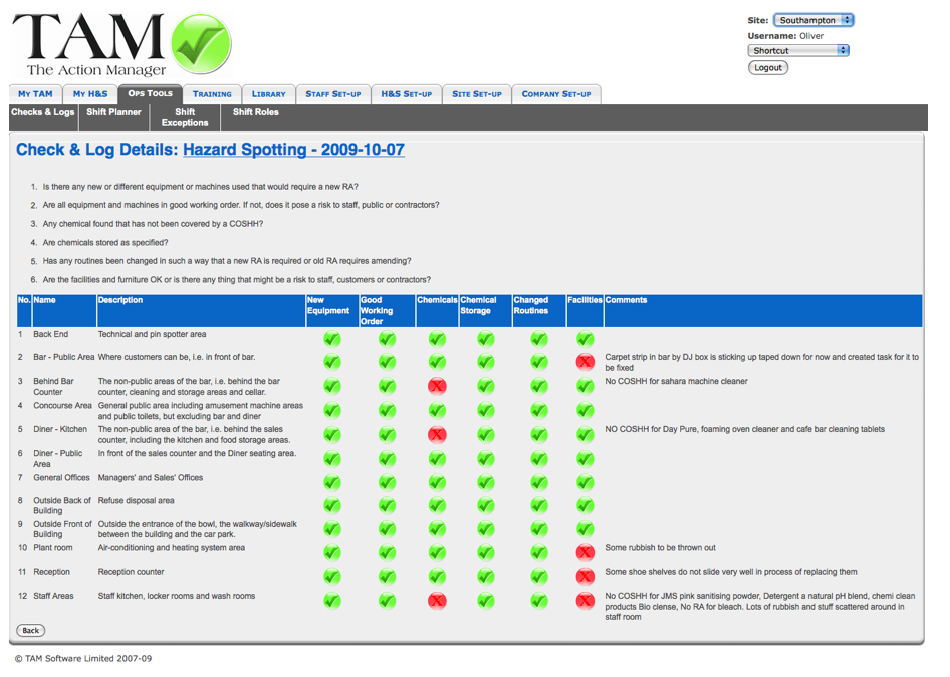
This shows a historical record of a Hazard Spotting exercise. Any problems (red dots) will require a comment to be entered, and this comment together with the problem reported will automatically be sent as a TAM Message from the person who completed the checklist to the 'Owner' of the Hazard Spotting exercise for him/her to deal with.

You will be able to specify how often you want the Hazard Spotting exercises to take place throughout your company and sites.

The Site Responsible Person for Health and Safety will then nominate who should be responsible for carrying out the Hazard Spotting exercises. In a small business, one person can probably handle the Hazard Spotting throughout all your Geographic AreasYour workplace is divided into Geographic Areas on TAM and covers all areas inside and outside were staff and contractors may venture as part of their work., however, in a large company this responsibility may need to be shared amongst a few people to make sure each one is familiar with their respective Geographic AreaYour workplace is divided into Geographic Areas on TAM and covers all areas inside and outside were staff and contractors may venture as part of their work..

In order for you to get up and running quickly,the TAM Health & Safety software provides you with a Hazard Spotting checklist template of what the Hazard Spotting exercise should entail. However, this Hazard Spotting template can easily be modified to suit your organisation's and each one of your Geographic Area'sYour workplace is divided into Geographic Areas on TAM and covers all areas inside and outside were staff and contractors may venture as part of their work. unique requirements

The Hazard Spotting exercises are logged onto TAM and any new hazards are noted down, even those that have already been dealt with (e.g. repaired a torn carpet that was posing a trip hazard). These notes, and in particular any new hazards that have not been dealt with, are then flagged up to the Health and Safety Committee for them to act upon (e.g. a work process that has changed and now requires a review of a Risk Assessment and Safe Systems of Work).

The TAM Health & Safety software then keeps a log of all the Hazard Spotting exercises which can then be accessed online from anywhere 24/7.

Get The Action Manager Now for only £1.00 per User per Month45 DAY MONEY BACK GUARANTEE